
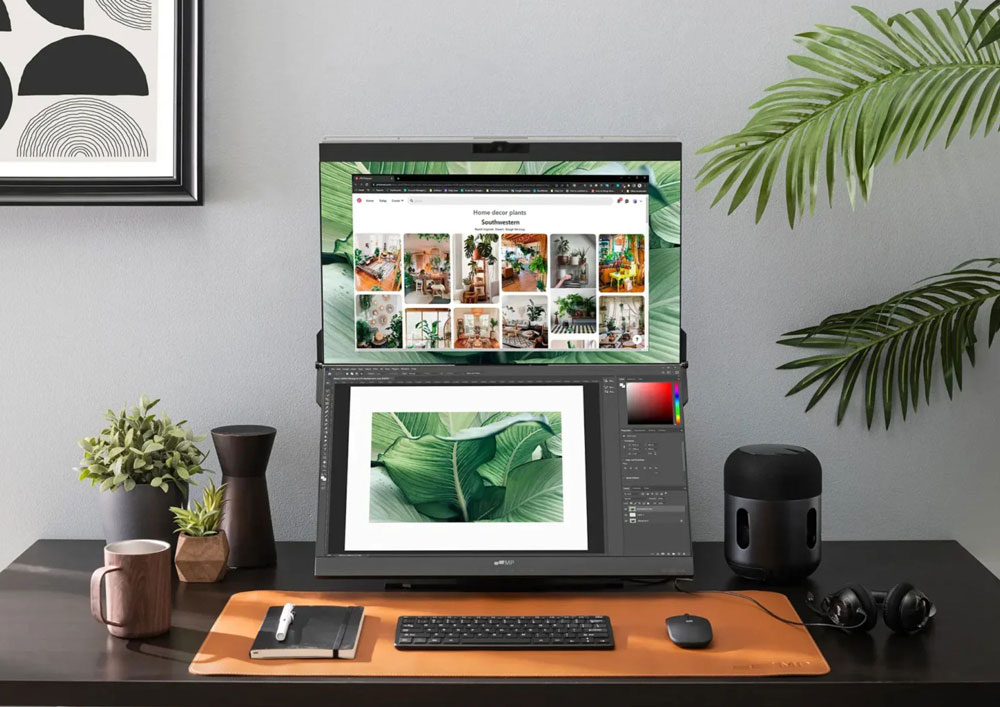
Modern office work often requires employees to keep several applications, documents and information sources open at the same time. A traditional dual-monitor setup solves part of the problem, but it can also take up a considerable amount of desk space. Stacking monitors vertically offers another approach: instead of making the workspace wider, it makes it taller, giving workers more screen space without requiring a larger desk.
Stacked Monitors Give Workers More Screen Space Without a Bigger Desk
A stacked monitor setup places one display directly above another rather than positioning both screens side by side.
The idea is simple, but it addresses a common problem in modern workplaces.
Many employees need to work with multiple applications simultaneously. A financial analyst may need a spreadsheet, financial data and reports. A programmer may need code, documentation and a terminal. A project manager may need project software, communication tools and schedules.
With only one monitor, switching between these applications can become repetitive.
A traditional side-by-side setup provides additional space, but it also makes the workstation wider. For employees working at smaller desks, that can create problems with speakers, documents, keyboards and other equipment.
Stacking the displays vertically uses space that would otherwise remain unused.
The lower monitor can serve as the primary workspace, while the upper monitor provides additional information, dashboards or reference material.
Instead of constantly minimizing windows or switching between applications, workers can keep more information visible at the same time.
The result is essentially a larger digital workspace without requiring a larger physical desk.

Multiple Screens Can Make Multitasking Much Easier
The biggest advantage of multiple monitors is not simply having more pixels.
It is the ability to organize information.
A worker can assign a specific purpose to each display.
For example, the lower monitor might contain the application being used most frequently, while the upper monitor displays email, communication tools or reference documents.
This creates a form of task segmentation.
Instead of having every application compete for the same screen, each one has a designated location.
A project manager, for example, might keep a project-management platform on the primary display while monitoring team communication on the second screen.
A developer could work on code while keeping technical documentation or a terminal visible above it.
A financial analyst could use one screen for spreadsheets and another for market information or supporting reports.
The benefit is particularly noticeable when a job requires employees to compare information from different sources.
Rather than repeatedly changing windows, the information remains available.
However, adding more screens does not automatically make someone more productive.
A poorly organized multi-monitor setup can actually create more distractions.
The key is to give each screen a clear role.
The objective should be less friction, not simply more windows.
Want to see how a stacked monitor setup can transform a workspace? Watch the video to take a closer look at the setup, organization and productivity benefits of using multiple monitors vertically.
Some Jobs Benefit More From Stacked Monitors Than Others
Not every employee needs a stacked monitor arrangement.
For some roles, however, the additional screen space can be particularly useful.
Financial Analysts
Financial work often involves comparing multiple sources of information.
One display can show spreadsheets or financial models, while another can display market data, reports or other reference information.
This allows analysts to work with numbers while keeping supporting information visible.
Programmers and Developers
Software development frequently requires switching between code, documentation, terminals and debugging tools.
A stacked configuration can keep the main coding environment at eye level while placing documentation or other supporting tools on the second screen.
This can make it easier to reference information without repeatedly switching applications.
Project Managers
Project managers often have to monitor schedules, tasks, communication and project documentation simultaneously.
A multi-screen arrangement allows these different elements to remain visible.
For example, the primary monitor can display a project plan while the upper monitor shows team communication or a dashboard.
Customer Support Teams
Customer service employees may work with CRM systems, customer information, communication platforms and knowledge bases.
Keeping these resources visible on separate screens can reduce the amount of time spent switching between applications.
Operations and Monitoring Roles
Stacked displays can also be useful for employees who need to monitor dashboards, systems or real-time information.
In these situations, the ability to glance at several information sources at once can be more valuable than having one very large screen.
The important factor is the workflow.
If a job requires frequent reference between several applications, additional displays may provide a meaningful advantage.

The Right Setup Matters More Than Simply Adding Screens
Buying two monitors is only the beginning.
The way they are positioned can determine whether the setup is comfortable or frustrating.
A stacked configuration generally works best with an adjustable monitor stand, monitor arm or VESA-compatible mounting system.
These allow the displays to be positioned at appropriate heights and angles.
The primary monitor should normally be placed at a comfortable eye level because it is the screen the worker will look at most frequently.
The upper monitor can then be positioned for information that only needs to be checked occasionally.
This distinction is important.
If the upper display becomes the primary screen and the user has to look upward constantly, the arrangement may become uncomfortable.
Resolution also matters.
For typical office work, a display with at least 1080p resolution can provide adequate clarity for text and applications, although higher resolutions can offer additional workspace and sharper text depending on the monitor size and operating system.
Cable management is another small detail that can make a big difference.
Multiple monitors mean multiple power and display cables.
Without organization, those cables can quickly create clutter around the desk.
Cable clips, sleeves and under-desk cable trays can help keep the workstation cleaner.
A well-designed setup should make the desk feel more organized, not more complicated.
A Good Stacked Setup Should Improve Productivity Without Creating Strain
The ultimate purpose of a stacked monitor setup is to make work easier.
That means ergonomics should be considered alongside productivity.
The primary screen should be positioned so that the user’s head and neck remain in a natural position while working.
The upper monitor should generally be used for information that requires shorter periods of attention.
It can be useful for dashboards, communication windows, reference material or other information that needs to remain visible but does not require constant focus.
The angle of the upper monitor can also be adjusted so that it is easier to view without excessive neck movement.
The goal is not to force the worker to constantly look up.
It is to make additional information available with minimal interruption.
The software arrangement matters, too.
Instead of randomly placing applications across both screens, workers can organize them according to their workflow.
The most frequently used application should receive the most accessible position.
Supporting applications can occupy the secondary display.
Once this system becomes familiar, the workspace can function almost like a physical filing system: information has a consistent place, and the worker knows where to find it.
That is where stacked monitors can provide their greatest benefit. They are not simply adding another screen. They are creating a more structured digital workspace.

For professionals who spend hours working at a computer, a stacked monitor setup can be a simple but powerful workstation upgrade. It gives you more screen space without demanding a larger desk, makes multitasking easier and allows different tasks to stay organized across separate displays. The key is not simply adding more screens, but positioning and using them intelligently. A smarter workstation isn’t about having more monitors. It’s about making every screen work harder for you.